This domain is for sale. If interested, please, contact us at pelhrimov[AT]yahoo.com for more details.
Hide network name SSID - access point configuration
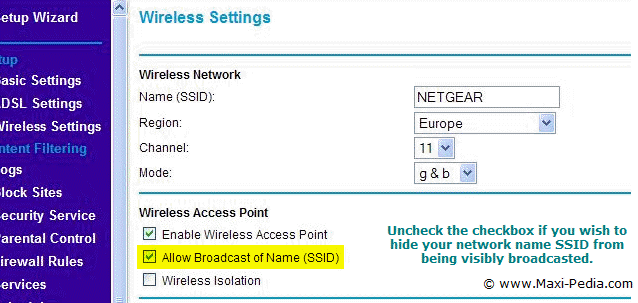
You can configure your wireless access point to hide your network ID or name from being visibly broadcasted. Uncheck the checkbox and reboot your router. You can find out more about other wireless security measures on the following page: Secure your WLAN (wireless security tutorial - part 4).
.
Discuss this article or this topic in our discussion forum:
(The table bellow shows a list of 8 most recent topics posted in our discussion forum. Visit our discussion forum to see more. It is possible the links below are not related to this page, but you can be certain you will find related posts in the discussion forum. You can post one yourself too.)
Email this article to a friend:
.
How can I link to this web page?
It is easy, just include the code provided below into your HTML code.
Maxi-Pedia
Search Maxi-Pedia
Interesting Topics
- What are the assumptions behind the Black-Scholes model?
- Pathping
- ISMS Information Security Management System
- Cash Asset Ratio (CAR)
- Excel 2003 INSERT menu commands in Excel 2007
- Do not display last user name Windows setting (dontdisplaylastusername)
- How to find MAC and IP addresses in network data
- USB 3.0 (Need for speed)
- IFE Matrix (Internal Factor Evaluation)
- Citrix MetaFrame Access Suite
Favorite Topic
More Details
Selected Topics
Maxi RSS Feeds


