This domain is for sale. If interested, please, contact us at pelhrimov[AT]yahoo.com for more details.
Carriage return and line feed problems
Carriage return and line feed problems
Line feed and carriage return are two different ways of how your computer sees the Enter key.
While for example the character M is interpreted the same way in Windows and in UNIX, the ENTER key is interpreted differently. This causes problems when transferring files and data from one platform to another one.
When transferring files from one platform to another, you can experience that ENTERs are not translated in a way thay you would expect.
Windows uses carriage return - line feed.
UNIX uses line feed.
Macintosh uses carriage return.
A line feed is expressed in hexadecimal as 0a. A carriage return is noted as hexadecimal 0d. Windows carriage return - line feed is 0a0d in hexadecimal notation.
How do I spot a problem with carriage return and line feed?
When you take a UNIX file and open it in Windows NOTEPAD, you will most likely see something like the following example:
<?php // $Id: blog.module,v 1.271.2.2 2007/04/23 17:05:11 dries Exp $
log_user($type, &$edit, &$user) {   if ($type == 'view' && user_acces
a page that displays the most recent blog entries from all the users
tion handbook <a href="@blog">Blog page</a>.', array('@blog' => 'http
ORDER BY n.created DESC"), 0, variable_get('feed_default_items', 10))
ser->uid) && user_access('edit own blog')) {       $output = '<li>'.
blog entries of all users.  */ function blog_page_last() {   global $
object(db_query('SELECT i.*, f.title as ftitle, f.link as flink FROM
ge) {     // Breadcrumb navigation     $breadcrumb[] = array('path' =
may_cache) {     $items[] = array('path' => 'blog', 'title' => t('Blo
blog', array('title' => t('Read the latest blog entries.'))) .'</div>
All the lines are compressed and enters are clearly missing. Well, they are not completely missing, they are just coded in a format that Notepad does not understand. Why this happens, you can find that at this page: Line termination: line feed versus carriage return.
How do I know what system a file was created in?
When you open the file in a HEX editor, you can tell by looking at the HEX code to find out whether your Enters were encoded as carriage returns, line feeds, or the pair of both.
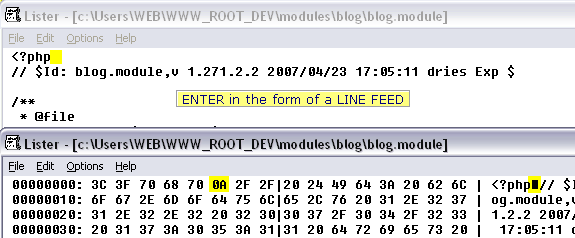
This picture shows you that Enters have been encoded as line feed.
How do I fix a problem with carriage return?
One way to fix this is to open the file using a HEX editor and replace all the "bad" enters with the "good" ones. In our case, we would replace all references to 0a with 0d0a. Then, this file should be readable by Windows Notepad.
One very nice and easy fix is to:-> open your file in Notepad,
-> copy the content of the file,
-> paste it into MS Word,
-> copy the text in MS Word,
-> and paste it back to Notepad
If you do this with the file pictured above, you will get the following result:
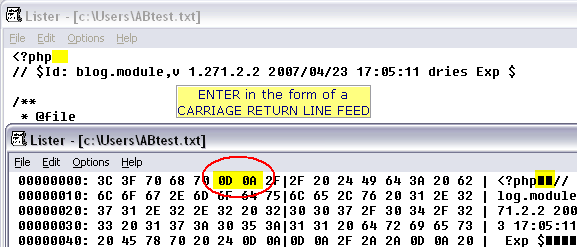
You can see that all Enters have been coded in a form of carriage return - line feed, that is 0d0a.
You can open the file in Windows Notepad and see the code nicely formatted line by line as they were on the UNIX computer.
Where can I find what all the codes mean?
In case you are wondering about the 3C 3F 45 68 codes, you can find some of them in the ASCII table.
.
Discuss this article or this topic in our discussion forum:
(The table bellow shows a list of 8 most recent topics posted in our discussion forum. Visit our discussion forum to see more. It is possible the links below are not related to this page, but you can be certain you will find related posts in the discussion forum. You can post one yourself too.)
Email this article to a friend:
.
How can I link to this web page?
It is easy, just include the code provided below into your HTML code.
 Delicious
 Digg
Digg StumbleUpon
 Furl
Furl Facebook
 Google
 Yahoo
Yahoo
Maxi-Pedia
Search Maxi-Pedia
Interesting Topics
Related Topics
Favorite Topic
More Details
Selected Topics
Maxi RSS Feeds


