This domain is for sale. If interested, please, contact us at pelhrimov[AT]yahoo.com for more details.
Wireless Access Point (WAP)
Wireless Access Point (WAP)
Wireless Access Point (WAP) is a device that is used to connect one or more computers to an existing physical wired network. Wireless access point is a crucial item in the wireless to wired LAN (Local Area Network) connectivity that is responsible for negotiating a connection between the end user and usually a wired LAN.
A wireless access point functions as a bridge between the wired and wireless part of the network. This setup is also often called infrastructure networking.
What is a Wireless Access Point (WAP)?
A wireless access point includes a radio receiver/transmitter and antenna. The radio transmitter translates a data stream going from the wired network into radio waves and sends them out to the space. A radio receiver aggregates wireless radio signals coming from wireless-network clients and then translates them into signals to be sent to the wired network. A transmitter/receiver unit is also responsible for some degree of encryption and protection of data using communications and encryption software.
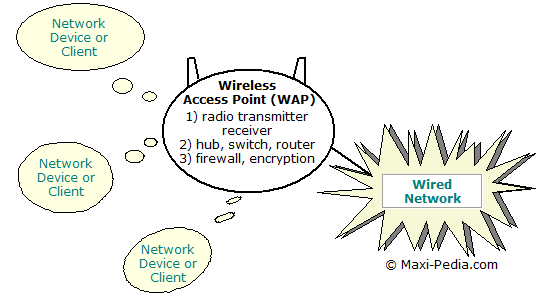
Another part of the wireless access point may be in some cases a router, switch, or a hub. These devices control what data and which messages get through the access point. Simply said, we can explain it this way:
The transmitter and receiver are the piers of the bridge on the wireless side; router, switch, or a hub is the first pier of the bridge on the wired side of the network.
In case the wireless access point does not contain a hub, switch, or router itself, it usually provides an Ethernet port for a cable connection to a hub, switch, or router on the wired LAN.
No two wireless access points are the same
Wireless access points come in many different flavors. Some have an external antenna, some have built-in antenna, some have built-in routers, some have only built-in hubs, some have only an Ethernet connection and some feature firewalls and other devices. Wireless access points differ also in the level of built-in security features and bandwidth (standards) that they support. The complexity and sophistication of the firewall software that is built into the wireless access point can also make a big difference when shopping for one.How to choose the right wireless access point?
You can find more details about that on the next page: How to choose the right wireless router?
.
Discuss this article or this topic in our discussion forum:
(The table bellow shows a list of 8 most recent topics posted in our discussion forum. Visit our discussion forum to see more. It is possible the links below are not related to this page, but you can be certain you will find related posts in the discussion forum. You can post one yourself too.)
Email this article to a friend:
.
How can I link to this web page?
It is easy, just include the code provided below into your HTML code.
 Delicious
 Digg
Digg StumbleUpon
 Furl
Furl Facebook
 Google
 Yahoo
Yahoo
Maxi-Pedia
Search Maxi-Pedia
Interesting Topics
- Wireless Wi-Fi network security tutorial 101 (part 1)
- What is DFS root and how to create one
- Difference between shared folder and DFS root
- NET SEND command
- Cycle stealing (grid/distributed computing)
- FollowSymLinks
- NET SHARE command
- NET USE command
- How to find MAC and IP addresses in network data
- Tracert
Related Topics
Favorite Topic
More Details
Selected Topics
Maxi RSS Feeds


