This domain is for sale. If interested, please, contact us at pelhrimov[AT]yahoo.com for more details.
Excel 2003 DATA menu translated into Excel 2007
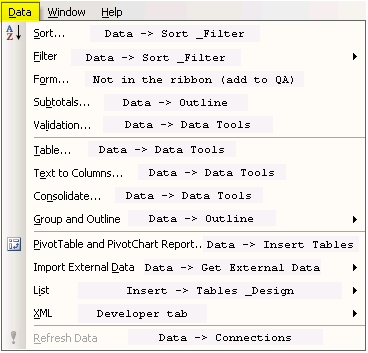
This picture displays how items in the DATA menu in Excel 2003 translate into menu items and ribbon objects in Excel 2007.
Note, one item in the picture is labeled as Not in the Ribbon (add to QAT). This means that you won't find this item in the ribbon. If you need this easily accessible, you have the option of placing this command to the Quick Access Toolbar (QAT).
.
Discuss this article or this topic in our discussion forum:
(The table bellow shows a list of 8 most recent topics posted in our discussion forum. Visit our discussion forum to see more. It is possible the links below are not related to this page, but you can be certain you will find related posts in the discussion forum. You can post one yourself too.)
Email this article to a friend:
.
How can I link to this web page?
It is easy, just include the code provided below into your HTML code.
Maxi-Pedia
Search Maxi-Pedia
Interesting Topics
- Wireless Access Point (WAP)
- How to add URL to Google
- Cash Asset Ratio (CAR)
- 32 Bit or 64 Bit Operating System
- System error 85 has occured
- Show Desktop Icon on the Quick Launch Toolbar
- JavaScript document.write(): How to view the HTML?
- 2011 federal tax rates tables
- Robin Hood Index
- Server Net Commands
Favorite Topic
More Details
Selected Topics
Maxi RSS Feeds


