This domain is for sale. If interested, please, contact us at pelhrimov[AT]yahoo.com for more details.
Internet Explorer reuse windows for launching shortcuts
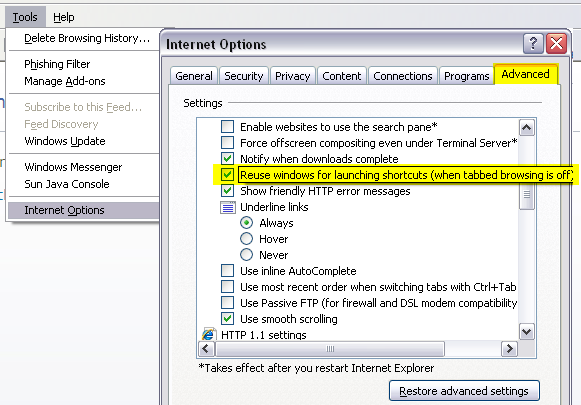
The Reuse windows for launching shortcuts setting in your Internet Explorer is used to determine whether a new or existing instance of Internet Explorer is used when clicking a link in Outlook.
If you wish to change the setting for your Outlook email client so that new links open in a new window each time you click on a link inside your email, uncheck the Reuse windows for launching shortcuts coption.
When this setting is selected, an open instance of Internet Explorer is used to display a web site. If the box is unchecked, clicking a link in Outlook email starts a new instance of Internet Explorer.
.
Discuss this article or this topic in our discussion forum:
(The table bellow shows a list of 8 most recent topics posted in our discussion forum. Visit our discussion forum to see more. It is possible the links below are not related to this page, but you can be certain you will find related posts in the discussion forum. You can post one yourself too.)
Email this article to a friend:
.
How can I link to this web page?
It is easy, just include the code provided below into your HTML code.
Maxi-Pedia
Search Maxi-Pedia
Interesting Topics
Favorite Topic
More Details
Selected Topics
Maxi RSS Feeds


