.
Maxi-Pedia your resource for finance & IT!
.

Internet Explorer setting - enable Active Scripting 
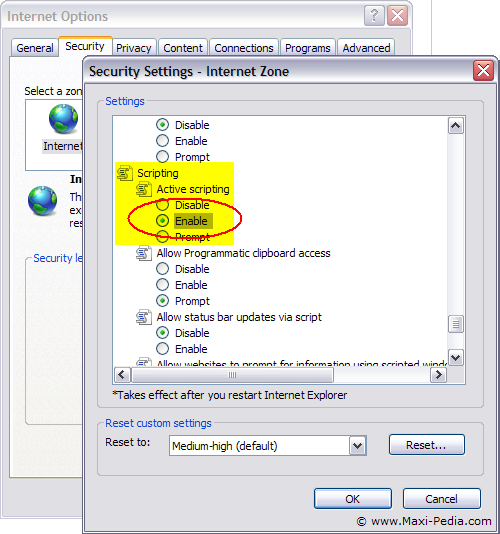
Internet Explorer setting - enable Active Scripting

Announcement: Hi, we here at Maxi-Pedia are pleased to let you know that we just improved this website and launched Maxi-Pedia Directory. Are you looking for a consultant, professional, someone who can help you with your business? Take a look at our Directory. Would you like to be listed in our Directory? Let us know. Maxi-Pedia Directory

Internet Explorer setting - enable Active Scripting


Internet Explorer setting - enable Active Scripting

You can find more about this setting and what it relates to at the Scripts are usually safe. Do you want to allow scripts to run? page.

Email this article to a friend:

TO: 
FROM: 
2 + 6 - 3 = 

Discuss this article or this topic in our discussion forum:

(The table bellow shows a list of 8 most recent topics posted in our discussion forum. Visit our discussion forum to see more. It is possible the links below are not related to this page, but you can be certain you will find related posts in the discussion forum. You can post one yourself too.)

How can I link to this web page?

It is easy, just include the code provided below into your HTML code.

<a href="http://www.maxi-pedia.com/Internet+Explorer+setting+enable+Active+Scripting" title="www.Maxi-Pedia.com: Internet Explorer setting - enable Active Scripting" target="_blank">Internet Explorer setting - enable Active Scripting</a>

Where can I get some help with this?

.

Copyright © 2010 Maxi-Pedia http://www.Maxi-Pedia.com
Reproduction without written permission from Maxi-Pedia is prohibited.
All articles are protected by copyright and have been archived at a national library.
Linking to Maxi-Pedia pages is permitted provided that the links are clearly acknowledged. Thank you.