This domain is for sale. If interested, please, contact us at pelhrimov[AT]yahoo.com for more details.
Allow shared folders to be published
Allow shared folders to be published
Allow shared folders to be published is a policy related to allowing network users to share resources on your network. If Allow shared folders to be published is enabled or not configured at all, your users will be able to make their shared folders available to other users across your network through Active Directory.
The Allow shared folders to be published group policy is a setting that can help a lot with the management of your corporate shared resources.
What is Allow shared folders to be published?
The Allow shared folders to be published group policy is a setting that allows or disallows users to publish shared folders in Active Directory. What it means when a folder gets published in Active Directory? See this page for more details on this topic: How to publish shared folder in Active Directory.
Where can I find the Allow shared folders to be published policy?
You can find the Allow shared folders to be published policy in the Group Policy editor (How to edit group policy) under the User Configuration container.
-> User Configuration
-> Administrative Templates
-> Shared Folders
The following print screen shows the Allow shared folders to be published policy.
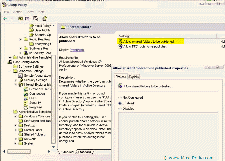
When you navigate to the Shared Folders container in Group Policy editor, you will find two policies which sound very similar in that location. One policy is called Allow shared folders to be published, and the other policy is called Allow DFS roots to be published. If you want to know the difference between these two policies, see the following page: Difference between shared folder and DFS root.
Allow shared folders to be published default value
Allow shared folders to be published is set to "not configured" by default. This means that your network users are able to publish folders they create and make them available in the Active Directory. If you enable this setting or do not configure it at all, users will be able to publish their shared folders in Active Directory.
If you set the Allow shared folders to be published policy to disabled, your users will not be able to publish shared folders in Active Directory.Windows support for the Allow shared folders to be published policy?
Allow shared folders to be published is supported starting with Microsoft Windows XP Professional and Windows Server 2003 on the server side.
Can I find the Allow shared folders to be published policy in registry?
Yes, if you wish to check the Allow shared folders to be published policy setting in registry, you can do so by navigating to the following key:
HKCU\Software\Policies\Microsoft\Windows NT\SharedFolders!PublishSharedFolders
Note, when you navigate to the registry editor screen, you will find there another very similar key called SharedFolders!PublishDfsRoots. This key relates to the Allow DFS roots to be published policy. You can read more about the difference between these policies on the following page: Difference between shared folder and DFS root.
.
Discuss this article or this topic in our discussion forum:
(The table bellow shows a list of 8 most recent topics posted in our discussion forum. Visit our discussion forum to see more. It is possible the links below are not related to this page, but you can be certain you will find related posts in the discussion forum. You can post one yourself too.)
Email this article to a friend:
.
How can I link to this web page?
It is easy, just include the code provided below into your HTML code.
 Delicious
 Digg
Digg StumbleUpon
 Furl
Furl Facebook
 Google
 Yahoo
Yahoo
Maxi-Pedia
Search Maxi-Pedia
Interesting Topics
- IPSec, VPN, architecture (wireless security tutorial - part 3)
- Time to Live (TTL)
- How to find MAC and IP addresses in network data
- System error 67 has occurred
- Grid computing - distributed computing
- Allow DFS roots to be published
- How to break MAC filtering (wifi security)
- Server Net Commands
- NET USE command
- FollowSymLinks
Related Topics
Favorite Topic
More Details
Selected Topics
Maxi RSS Feeds


